Network Packets
A packet is the unit that networks actually move. Every web request, video call, and SSH session is chopped into packets, addressed, routed independently, and reassembled at the far end. If you can read a packet, you can see exactly what a machine is saying on the wire — which is why packet analysis sits at the core of both attack and defence.
What a Packet Actually Contains
A packet is not one blob of bytes. It is a stack of headers wrapped around a payload, one header per protocol layer. As data moves down the sending stack, each layer prepends its own header (encapsulation); on receipt, each layer strips its header off (decapsulation).
A typical packet carrying web traffic looks like this from outside to inside:
[ Ethernet header ][ IP header ][ TCP header ][ TLS / HTTP payload ]
   L2 / link          L3 / net     L4 / transport   L7 / application
- Ethernet (Layer 2) — source and destination MAC addresses, used to move the frame across a single link segment.
- IP (Layer 3) — source and destination IP addresses, TTL, and the protocol number of the next header. This is what routers read to forward the packet across networks.
- TCP/UDP (Layer 4) — source and destination ports, plus TCP’s sequence and acknowledgement numbers and control flags (SYN, ACK, FIN, RST).
- Payload (Layer 7) — the actual application data: an HTTP request, a DNS query, a chunk of a file.
The strict term is a little more precise: at Layer 2 the unit is a frame, at Layer 3 a packet, and at Layer 4 a segment (TCP) or datagram (UDP). In practice people say “packet” for all of them.
Why Data Is Split Into Packets
- Segmentation. Large messages are broken into packets small enough to fit the link’s Maximum Transmission Unit (MTU), commonly 1500 bytes on Ethernet. The receiver reassembles them in order.
- Independent routing. Each packet is forwarded on its own. Two packets in the same flow can take different paths and still arrive; the network adapts to congestion and failure hop by hop.
- Sharing the wire. Because everyone’s data is interleaved as small packets, one large transfer can’t monopolise a link — many conversations share the same physical medium.
Reliable vs. Best-Effort Delivery
The delivery guarantees depend on the transport protocol, not the packet itself.
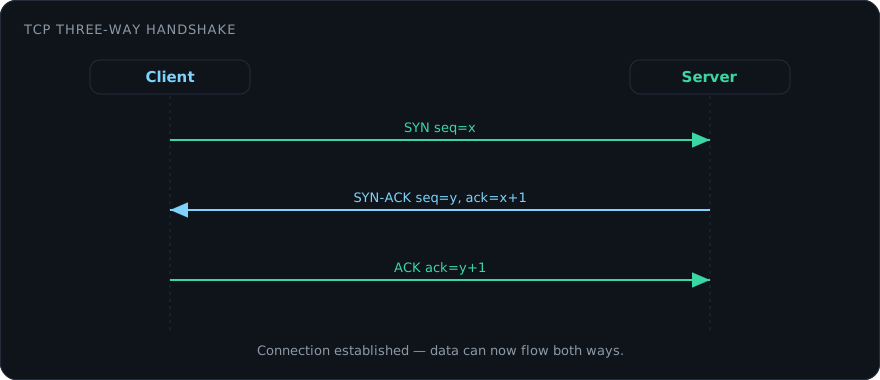
- TCP is connection-oriented. It numbers bytes with sequence numbers, acknowledges what it receives, retransmits anything lost, and delivers the stream in order. This is what the three-way handshake (SYN → SYN-ACK → ACK) sets up.
- UDP is connectionless and best-effort. No handshake, no acknowledgements, no retransmission. It trades reliability for low latency, which suits DNS lookups, real-time voice, and video.
IP itself makes no delivery promise. Error detection at Layer 3 is limited to a header checksum (which the IPv6 header drops entirely, leaving integrity to the upper layers).
Capturing and Reading Packets
Watching real traffic is the fastest way to understand it. The two workhorse tools are tcpdump on the command line and Wireshark for a full graphical dissection. This is the practical side of packet sniffing.
Capture the first few packets on an interface and print a readable summary:
sudo tcpdump -i eth0 -n -c 20
Filter to a single host and port using a BPF (Berkeley Packet Filter) expression, and write the results to a file you can open in Wireshark later:
sudo tcpdump -i eth0 -n 'host 192.168.1.10 and tcp port 443' -w capture.pcap
Inside Wireshark, display filters narrow a large capture to what matters:
tcp.flags.syn == 1 and tcp.flags.ack == 0    # connection attempts (SYNs)
http.request.method == "POST"                # HTTP POST requests
dns and ip.addr == 8.8.8.8                    # DNS to a specific resolver
Follow a TCP stream in Wireshark (right-click a packet, Follow → TCP Stream) to reassemble the packets of one conversation back into the original request and response.
You only have the right to capture traffic on networks and systems you own or are explicitly authorised to test. On a shared or corporate network, sniffing other people’s traffic is very likely illegal — keep your work inside an authorised scope or your own lab.
Crafting Packets by Hand
Analysis reads packets; testing often means building them. Scapy, a Python library, lets you assemble a packet layer by layer and put it on the wire — useful for protocol experiments, firewall rule testing, and reproducing a bug.
from scapy.all import IP, TCP, sr1

# Send a single SYN to port 80 and print the reply
pkt = IP(dst="192.168.1.10") / TCP(dport=80, flags="S")
reply = sr1(pkt, timeout=2, verbose=False)
if reply:
    print(reply.summary())
This is exactly the primitive behind a SYN scan — the technique Nmap uses for fast, half-open port scanning. Sending a SYN and reading whether the target answers with SYN-ACK (open) or RST (closed) tells you the port’s state without completing the handshake.
Packets and Defence
Because every conversation is visible as packets, defenders inspect them too. A firewall makes allow/deny decisions on header fields — addresses, ports, and TCP flags — while stateful and deep-packet-inspection engines track whole flows and peer into payloads. Intrusion detection systems match packet contents against signatures of known attacks. The same header fields an attacker manipulates to evade detection are the fields a defender monitors to catch them, which is why fluency in packet structure pays off on both sides of the keyboard.