Networking
Networking is the discipline that connects systems so they can share data, and it is the single most transferable skill in security work. Almost every technique in this handbook, from scanning to exploitation to defence, is really about understanding how machines talk and where those conversations can be observed, redirected, or broken. This page is background for authorised testing and defence; do not probe networks you have no permission to touch.
Why Networking Is the Foundation
The internet is a network of networks, and the network is where nearly all attacks and defences play out. If you cannot reason about what a packet contains and where it goes, every tool you run is a black box.
- Scanning sends crafted packets and interprets the responses to learn what hosts and services exist.
- Exploiting a service means speaking its protocol precisely enough to trigger a flaw.
- Intercepting traffic through packet sniffing only makes sense once you know how frames move across a segment.
Blue teams work from the same knowledge in reverse: they read logs, flows, and captures to spot the conversations that should not be happening.
The Two Models You Actually Use
Two layered models describe how data moves. Learn both, because tools and documentation reference them constantly.
OSI: The Teaching Model
The Open Systems Interconnection (OSI) model splits communication into seven layers, from physical cabling up to the application.
- Physical — cables, radio, voltages, and signalling.
- Data Link — frames and MAC addressing on a local segment (Ethernet, Wi-Fi).
- Network — logical addressing and routing between networks (IP).
- Transport — end-to-end delivery, ports, and reliability (TCP, UDP).
- Session — setting up and tearing down connections.
- Presentation — encoding, serialisation, and encryption.
- Application — the protocols users touch (HTTP, DNS, SSH).
The value for a tester is diagnostic: naming the layer tells you what class of attack and defence applies. A deauthentication attack lives at Layer 2, a SYN flood at Layer 4, and SQL injection at Layer 7.
TCP/IP: The Model the Internet Runs On
Real networks run the TCP/IP (or Internet) model, which collapses OSI into four practical layers: Link, Internet, Transport, and Application. When you read a capture in Wireshark, this is the stack you are watching in action.
Addresses: IP and MAC
Two addresses identify a device, and confusing them causes endless mistakes.
- IP address — the logical, routable address used to reach a host across networks. IPv4 looks like
192.168.1.20; IPv6 like2001:db8::1. IPv6 is now widely deployed, so never assume a target is IPv4-only. - MAC address — the 48-bit hardware address on a network interface, used only within a local segment. It is not routed across the internet and, contrary to old lore, is easily changed in software.
Private ranges such as 10.0.0.0/8, 172.16.0.0/12, and 192.168.0.0/16 are not reachable from the public internet directly. They rely on NAT (Network Address Translation) at the router to share a public address, which is why your home devices all appear to the world as one IP. See IP Addresses for subnetting and CIDR notation.
Ports and Protocols
If an IP address is a building, ports are the numbered doors. TCP and UDP each provide 65,535 ports, and a service listens on one waiting for connections.
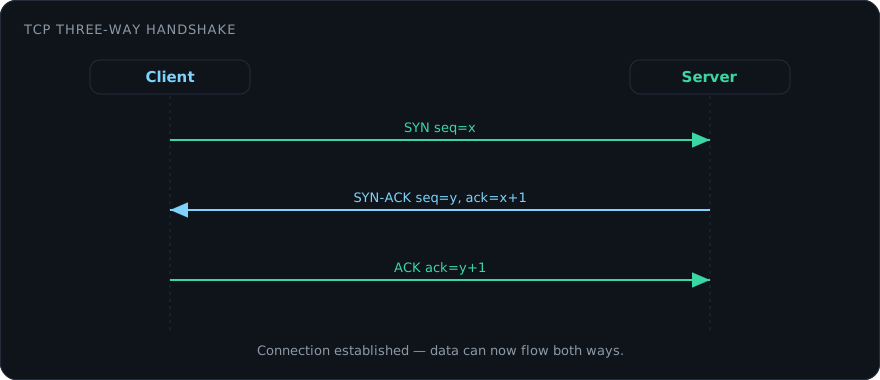
- TCP is connection-oriented: it performs a three-way handshake (SYN, SYN-ACK, ACK) and guarantees ordered, reliable delivery. Web, SSH, and email use it.
- UDP is connectionless and fire-and-forget: lower overhead, no delivery guarantee. DNS queries, DHCP, and most real-time media use it.
Common defaults worth memorising:
| Port | Protocol | Purpose |
|---|---|---|
| 22 | SSH | Encrypted remote shell |
| 53 | DNS | Name resolution |
| 80 | HTTP | Web (cleartext) |
| 443 | HTTPS | Web over TLS |
| 445 | SMB | Windows file sharing |
| 3389 | RDP | Remote Desktop |
Discovering which doors are open is port scanning, and Nmap is the standard tool. A quick service-and-version scan of a host you are authorised to test:
# -sV probes open ports to identify the service and version
# -p- scans all 65,535 TCP ports
nmap -sV -p- 192.168.56.101
DNS: The Internet’s Phone Book
The Domain Name System translates human names like example.com into IP addresses. It is a hierarchy of resolvers, and it matters to testers because it leaks structure: subdomains, mail servers, and infrastructure often show up in DNS records. It is also a frequent target, from cache poisoning to data smuggled out over DNS queries.
# Resolve records and inspect the authoritative answer
dig example.com A
dig example.com MX
Routers, Switches, and Segmentation
- Switches forward frames between devices on the same local network using MAC addresses.
- Routers connect different networks and forward packets between them using IP addresses; your home router is also the default gateway to the internet.
Larger networks are carved into VLANs and subnets so that a compromise in one segment does not automatically expose the rest. That segmentation is exactly what an attacker tries to defeat when pivoting, and what a defender relies on to contain an incident. See Incident Response for how containment plays out.
Firewalls and Filtering
A firewall allows or blocks traffic against a rule set. Stateful firewalls track the state of connections, so a response to a request you initiated is permitted while an unsolicited inbound packet is dropped. Modern next-generation firewalls add application awareness and intrusion prevention.
For a defender, a firewall is a control to configure correctly; for a tester, it is a set of rules to enumerate and reason about, always within the boundaries of the engagement. Related controls include a VPN for encrypted transit and proxy servers for inspecting or relaying traffic.
Networking Across the Testing Lifecycle
Every phase of an authorised assessment leans on these fundamentals.
- Reconnaissance — mapping the target’s public footprint and address space.
- Scanning — using Nmap to find live hosts, open ports, and service versions.
- Exploitation — driving a payload over the wire to a vulnerable service, often via the Metasploit Framework.
- Pivoting — using a foothold on one host to reach systems that were not directly accessible, which is where subnetting and routing knowledge pays off.
Hands-on Lab: Follow One Request Across the Stack
Theory sticks once you watch a single request touch every layer. Do this only on machines you own: a virtual machine running Kali (the observer) and any web server or vulnerable VM on the same host-only network.
-
Find your lab interface. The host-only NIC is usually
eth0orenp0s8; confirm withip -brief address. -
Start a capture on the attacker VM, writing a file so you can dissect it later.
-nskips name resolution so the capture itself stays quiet:
# Replace eth0 and the IPs with your own; include the DNS server so its
# query and answer are captured alongside the web traffic
sudo tcpdump -i eth0 -n -w /tmp/trace.pcap host 192.168.56.101 or host 192.168.56.1
- Generate traffic from a second terminal. First resolve a name, then make a request so you capture DNS, the TCP handshake, and HTTP in one go:
dig @192.168.56.1 target.lab A
curl -v http://192.168.56.101/
- Stop the capture with
Ctrl-Cand open the file in Wireshark:
wireshark /tmp/trace.pcap
- Isolate the handshake. Paste this display filter to see only the opening SYN before the connection exists:
tcp.flags.syn == 1 && tcp.flags.ack == 0
Then right-click any packet in the exchange and choose Follow > TCP Stream to read the full HTTP conversation in cleartext.
Trace the sequence: the dig query and its UDP answer, the SYN / SYN-ACK / ACK that builds the connection, the GET / request, and the server’s response. Note that everything over port 80 is readable to anyone on the segment, which is the whole argument for TLS and exactly what packet sniffing exploits. Repeat against https:// and watch the payload turn to ciphertext after the handshake.
Build the Intuition Yourself
Reading about packets is no substitute for watching them, so run the lab above on hardware you own and repeat it until the sequence is second nature. Once the abstractions become concrete, the rest of the handbook reads like a map instead of a mystery.